Hi! Welcome to my blog and thank you for stopping by!
I've always been interested in tech (IBM was my first computer as a kid) and started learning how to build my own "art gallery" when I was young, so that I could show case my art like the professionals did. As I grew during high school, my focus shifted to primarily making art and wondering which art school I'd attend. I got accepted into Ringling College of Art and Design, but ultimately did not attend because of tuition. Then more real life came, and my immediate concern was applying "practicality" to my new adult world I was stepping into. After at starting college I still drew (I took a couple of art classes), but it became less and less, then eventually I stayed at my retail job after completing my A.A. degree. It was amazing the kind of customers that grew on you and you on them; they started asking me about my future. It took me a while to convince myself the route I needed to take to look at a new career after about 8 years being in retail. I knew for sure, I needed a change! So I did some researched, and eventually found my way back to html, css, and newly, javascript. As I started "relearning" the basics, I became curious about security in tech. And here we are! I will be chronicling my journey from a retail background into a new field. Hopefully you'll learn some cool things on the way as I move forward into a new chapter in my life!
Troubleshooting version control for Store Remote State (AWS)
Terraform Cloud is a great way to collaborate securely with others by storing your state remotely:
Terraform Cloud allows teams to easily version, audit, and collaborate on infrastructure changes. It also securely stores variables, including API tokens and access keys, and provides a safe, stable environment for long-running Terraform processes.
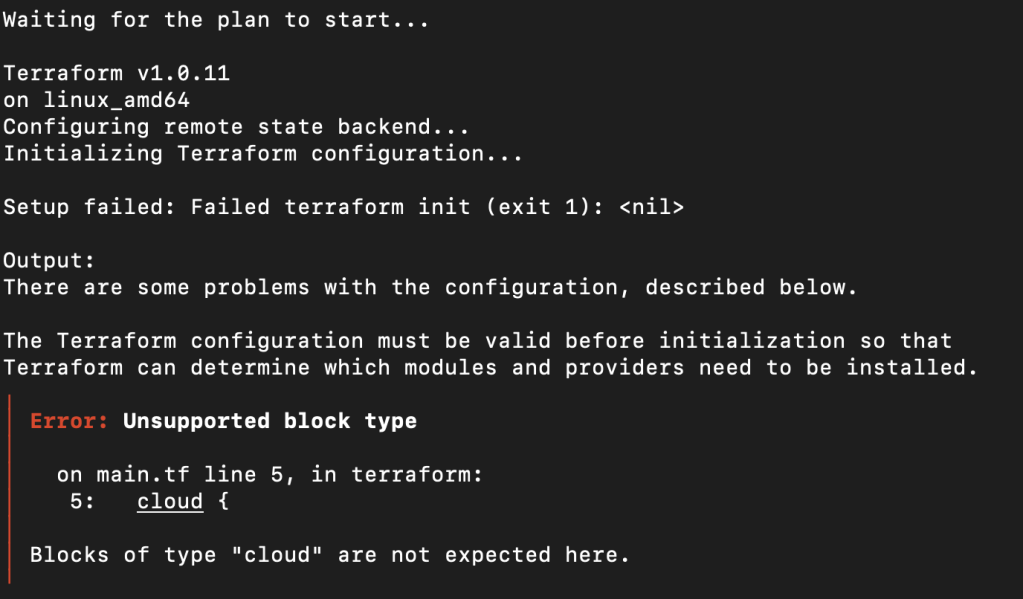
The Terraform cloud block has been integrated since v1.1.0 so if you’re using a previous version you will come across this error:
Terraform unsupported block type
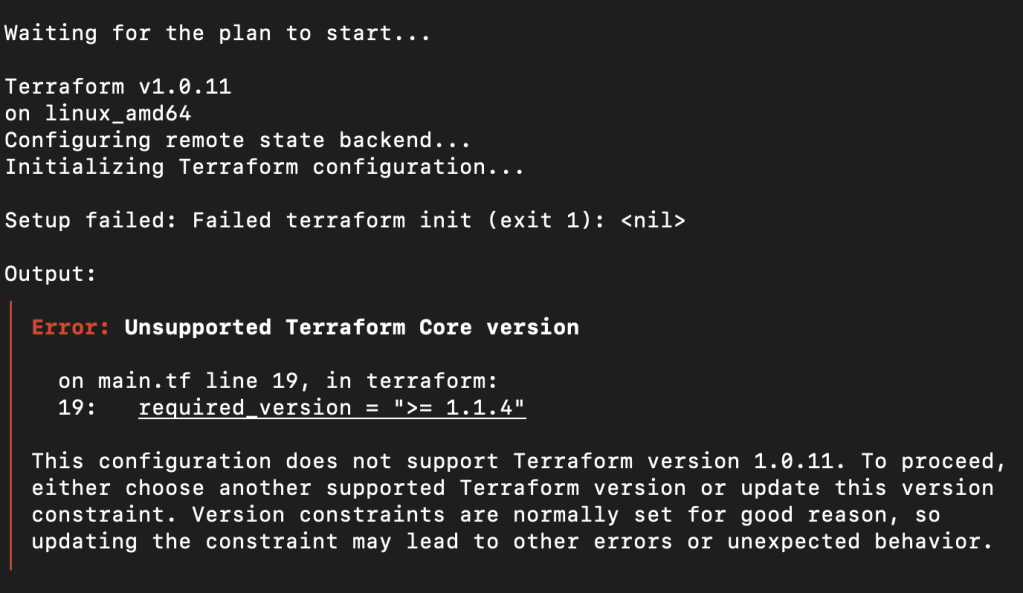
Notice on the third line it shows the version that your machine is attempting to work from: v1.0.11. Even if you have successfully updated (check using the command: terraform --version).
Terraform showing unsupported version error
At the time of this posting v1.1.4 is the current version. Please note the third line again showing that Terraform is getting its version from somewhere else and not the local machine I’m working from.
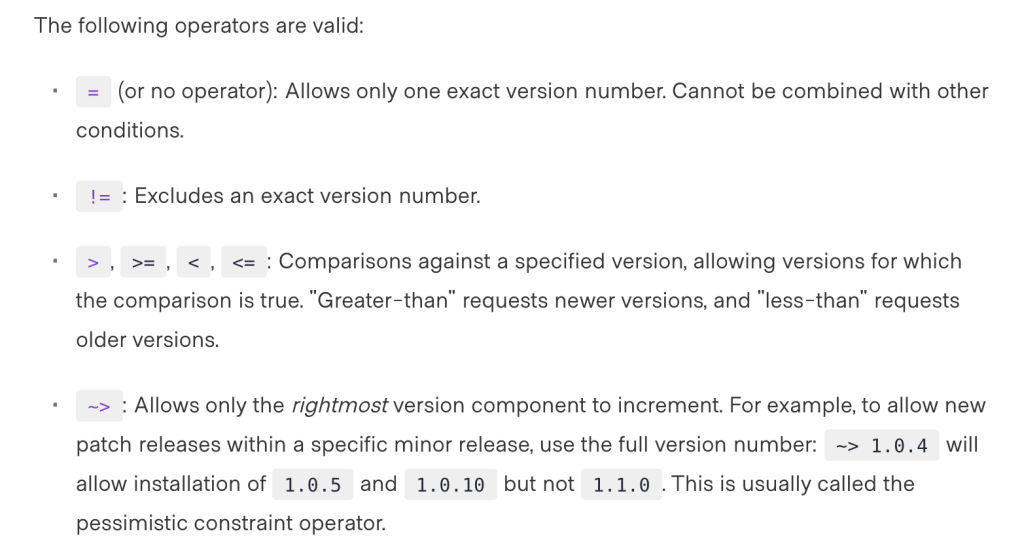
Issues with this error popping up even after I’ve updated Terraform made me refer to the version control rules that were acceptable:
Terraform valid operators for version control
I eventually went through other .tf files that might have been affecting which version Terraform was working from, until I realized I was still working in Terraform Cloud since that’s where I moved my state (meaning that it is no longer local to my machine).
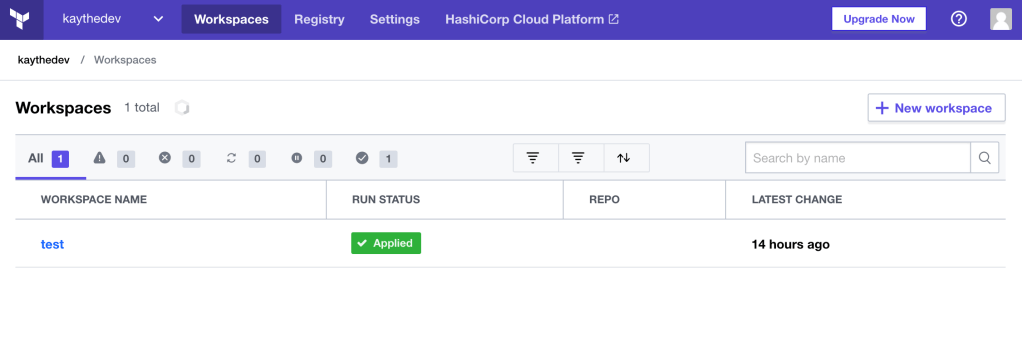
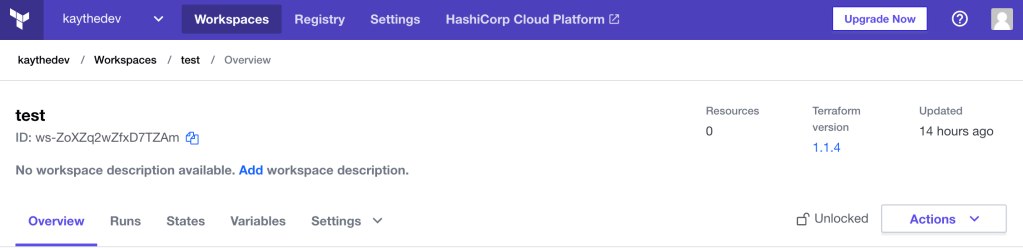
When you’re logged into Terraform Cloud, make sure to go to the workspace that you’ve connected to your project.
Terraform Workspaces
Once inside the workspace, in the top right you can see the version that is set for your workspace.
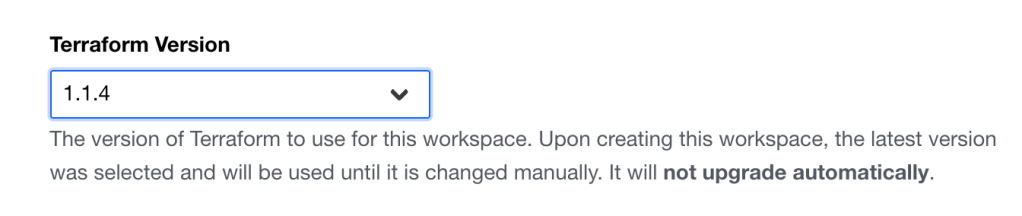
Click the that and you’ll see a drop down menu.
Terraform version menu
Once you set it to an acceptable version (v1.1.0 or higher) be sure to scroll to the bottom and save your settings.
Afterwards, you should be able add the cloud block to your infrastructure and proceed as normal.
*Special note: I am working from MacOS and using AWS as the provider.
I hop around a bit when I’m learning a new tool/program/etc. Sometimes it’s for a couple of hours, other times it’s for about a week or so. Whatever I do, I’m always looking at some sort of documentation, a blog, or help forum whenever I encounter an issue that needs troubleshooting.
Sometimes it feels overwhelming trying to figure out these things.
What I found that has helped me, is to write out a personal “tutorial” of sorts on how and why you got whatever you’re working on to, well, work. This helps you with a couple of things:
Learning how to document
Breaking down overtly technical concepts to non-technical or at least more understandable on your terms
Improve critical thinking skills: why is this not working? why did this solution work? (or why it didn’t) etc.
Doing this, I’ve started to see how simple is almost always best when breaking down instructions, issues, errors; the whole shebang.
An example:
In using Linux commands: Usually, if I’m trying to get past a step quickly or am just troubleshooting something annoying to get to that next step, I just run the command and keep going, other times I like to understand what certain flags are and why they are used.
Like this command and how I break it down as such:
find / -type d -name "name-of-directory" 2>/dev/null and file name: -type f -iname "name-of file"
-type d lets you search for a directory name
-type f lets you search for just the file name -iname makes the search name case-insensitive
2>/dev/null omits “permission denied” results
Here, I’m already familiar with the ‘find’ command and the ‘-name’ flag, but not with the rest.
Basically, this command refines search parameters and also removes irrelevant results.
By doing this, I am able to reinforce what I already know about the command. It also helps to add your own examples to help you understand it more on your terms.
On February 26, 2021, I was prepped to take the CompTIA Security+ exam at 5:45 AM at home. I made sure to go over those concepts that I wasn’t to sure about until I was confident well before, but especially that week of the exam. I set my alarm for 4 AM because why not? I’m always up early anyway so this time in the morning wasn’t really a big deal. An hour before my exam I went ahead and did a systems check to make sure everything was green; it was. I was a bit nervous, but felt more than ready to take the exam, so for a couple of minutes I just ate something small, drank some water and constantly watched the clock so that I could check in at the recommended 30 minutes before.
Everything seemed to be working like normal; you know, green and all.
If you’re taking the exam at home, just know it’s fully proctored by OnVue, Pearson’s proctoring software, so you have to install their software and let them “take control” of some things on your computer of choice. Understandable. I had to take pictures of my workspace; left, right, front, back of my where my computer was, get your ID loaded, and take a picture of yourself for verification purposes. OK, it’s really happening. I can see myself in the little camera window staring at my screen.
I get put into queue and wait in line to get to the proctor. Can’t back out now (not that I wanted to!). So now I’m up and I wait for verification. And I wait, and wait. And wait oh god, oh fuck, they’re gonna revoke my test because I did something wrong.
Nope.
A little chat window pops up and the proctor greets me then asks if my camera is live. “It is.”, I type back. And this is where my technical woes begin.
Did I mention that I was taking the exam on a Mac? This is important for later.
She says she isn’t able to see me on her end. Oh. “Please disable your firewall”. OK, no problem, I can see how that can cause an issue so I did. But she still can’t see me. She went on to do something on her end and a thing popped into my head that I did have a proxy running for a project I was doing. So I asked her if that could be an issue and asked for *permission to open my browser to disable it. Done, but still not resolved. I got disconnected, re-queued, several times with no communication in between. At this point I was getting frustrated because no one was saying anything. Finally, she asked me to restart, so I did. Nothing like a good ole “turn it off and on” to fix these issues.
Still nothing!
At this point it has been about an hour past my exam start time trying to figure this out. It eventually led to having my exam cancelled, which forced me to reschedule.
I. was. PISSED.
This was not my fault, as I saw their system requirements and met them AND I got confirmation from their systems check that I was good to go. What went wrong?
I was determined to take the exam the day I scheduled it. If that meant that was going to later in the day, then fine. I didn’t want to lose the confidence I had mustered this whole time planning for this exam. I immediately went to reschedule, but found that the remaining days left had been filled. I remembered when I first scheduled that people opt out frequently, so refreshing would probably make a new time available. I tried this for about 10 or so minutes and eventually got a new spot at 2:00 PM. Now I had about 6 hours to get this software working.
So what the hell went wrong?
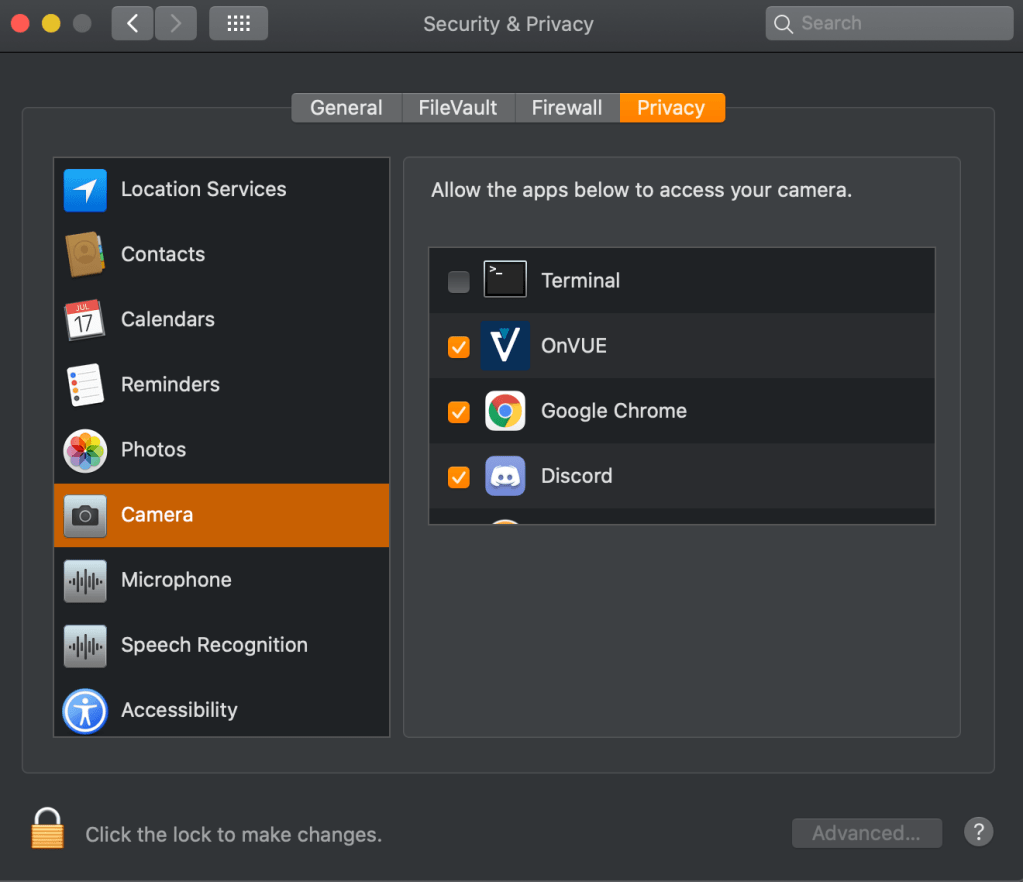
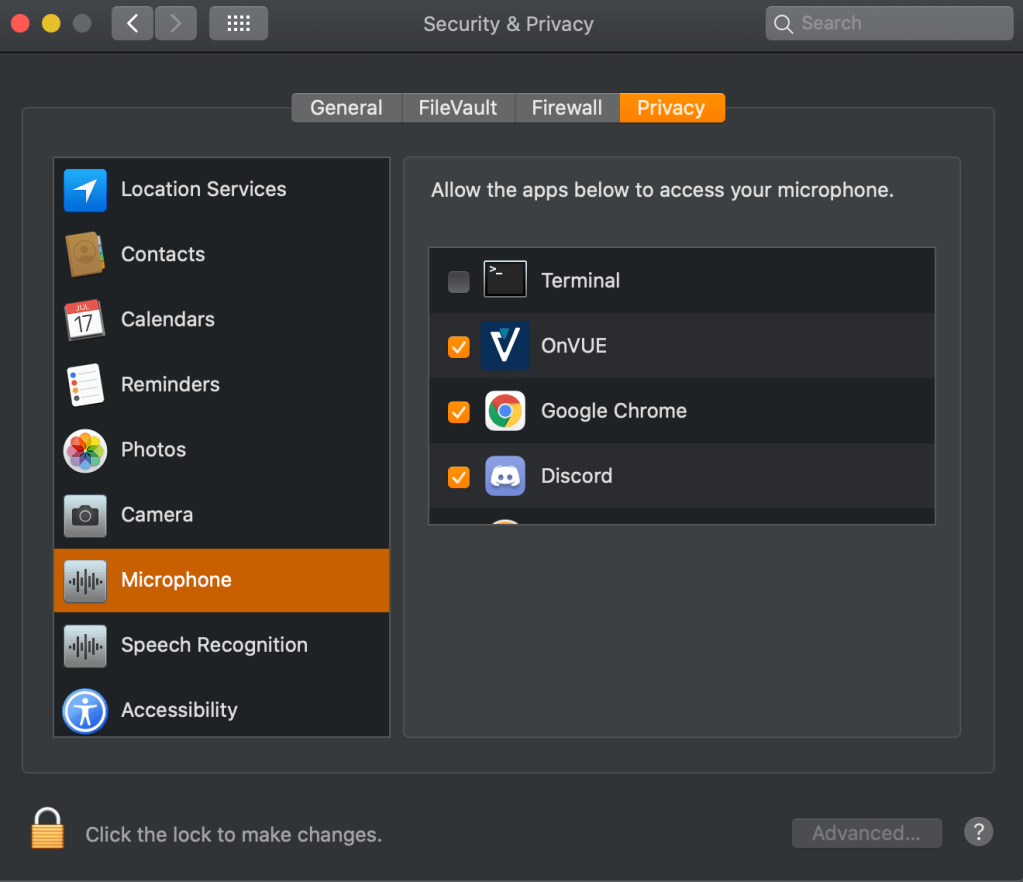
It’s the OnVue software. I don’t know the very technical specifics but Mac compatibility was definitely an afterthought when putting it together. These days, with almost all software downloads, Mac requires that it requests permissions. I noticed that didn’t happen after installing OnVue. I went to check my settings and it already had access to my camera, microphone, input, and full disk encryption. It was also supposed to have access to “automation”, but it was no where to be found and wasn’t possible to add. This was expressed in different forums with much frustration from others trying to figure out the same issues.
I eventually found a resolution! And this was about 3 hours before my exam. The following command forced OnVue to get the proper permissions it was missing (this command was from 3 years ago):
open -g /Applications/OnVUE.app/Contents/MacOS/proctorapp
I had to adjust mine to this:
open -g /Downloads/OnVue.app
Adjust according to where you downloaded the program.
The ‘-g’ flag will open the OnVue application in the background so that it doesn’t interfere with whatever else you’re doing.
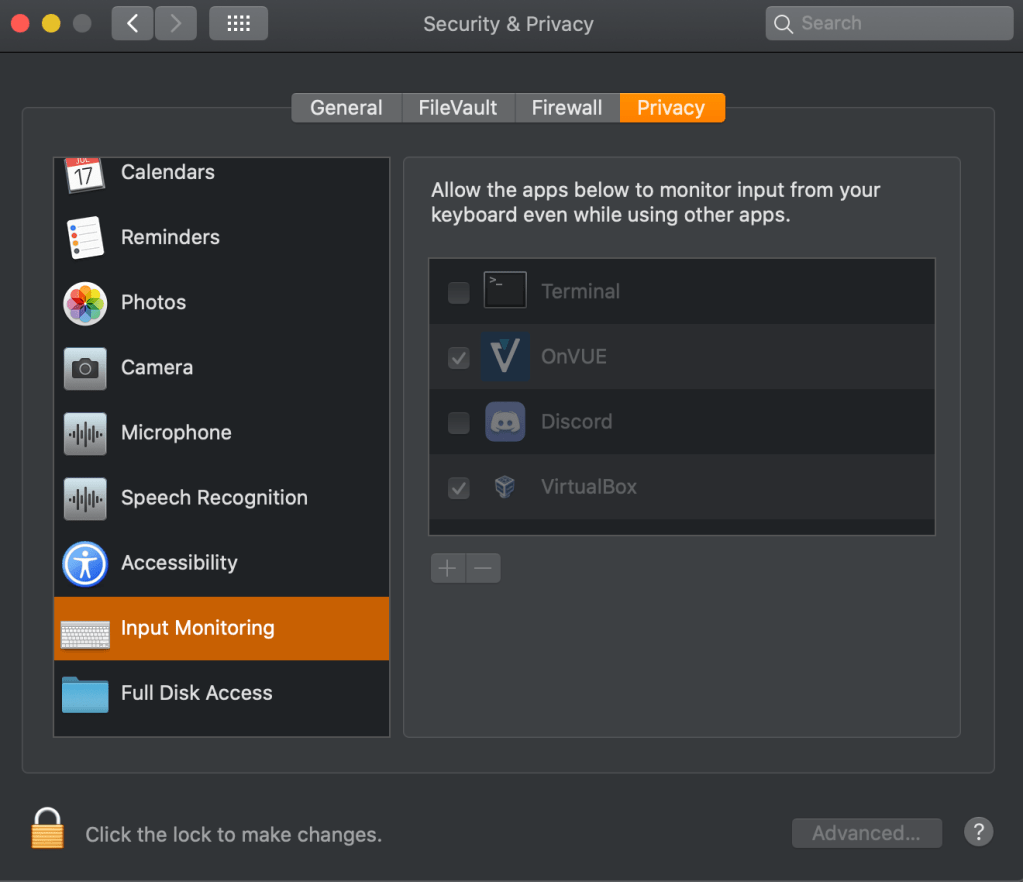
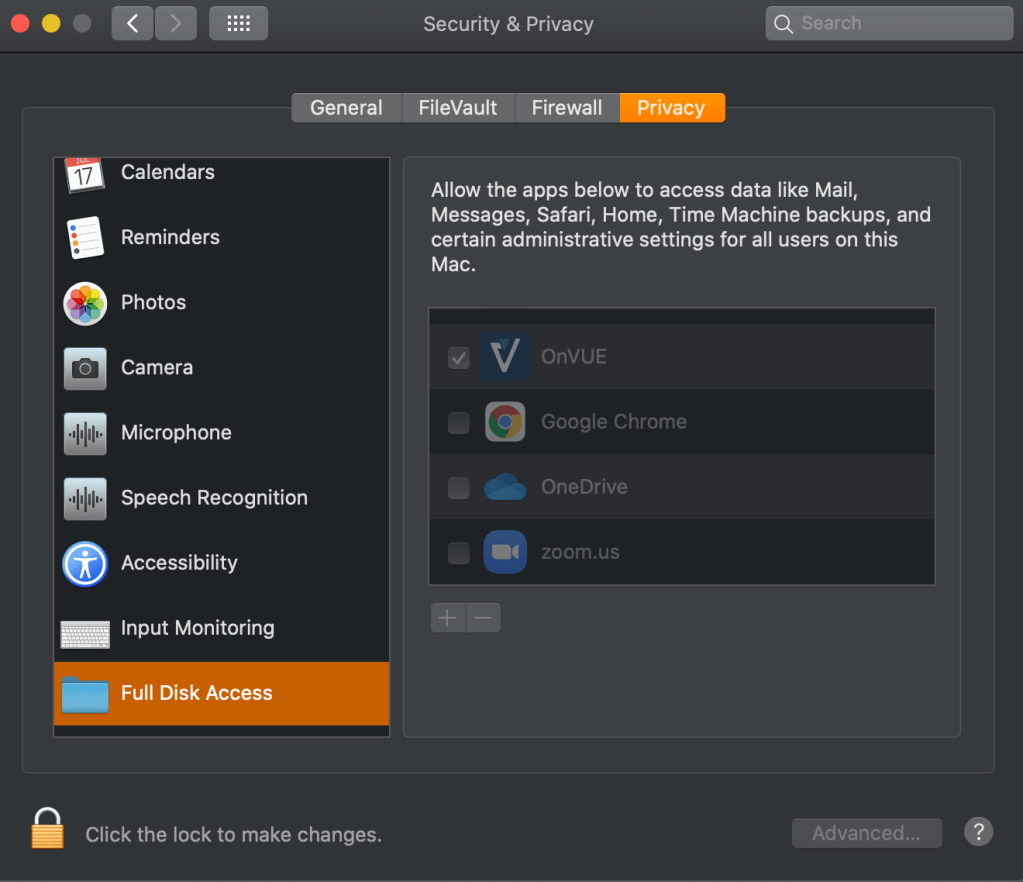
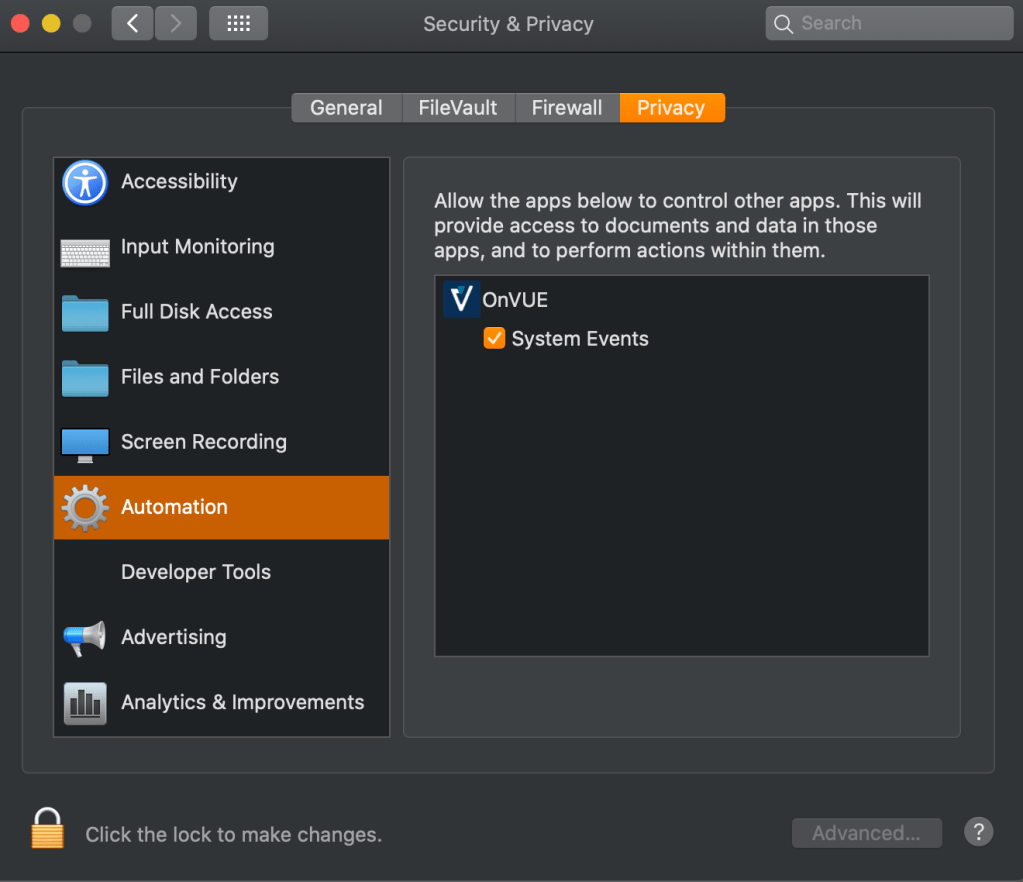
This will pop open OnVue and take you through the setup process that you most likely went through when first installing it. Make sure you go through with this setup running on your terminal all the way because this time it’s asking for proper permissions that include the crucial “automation” one. If you go through with the system check again, it will probably say everything is still green; this isn’t a good indicator that you’re all set. Go to your System Preferences and make sure that OnVue has access to the following:
OnVue Camera PermissionOnVue Microphone PermissionOnVue Input Monitoring PermissionOnVue Full Disk Access PermissionOnVue Automation Permission
After I confirmed these settings. I just had to wait until I could start the exam process again.
By the time that rolled around, I went through the entire process again and got the queue; everything working like normal until it was my turn for verification.
And it worked! It was a little janky doing the performance based questions that had you do drag and drop, but ultimately I was able to take the test with no further issues. After all that frustration, I was able to keep it together and passed the Security+ exam.
If you plan on taking the exam on a Mac, just know it’s possible and hopefully don’t give up! Use this solution I found and check the permissions noted above and be confident your system’s check is green.
*A note: Throughout troubleshooting, I asked permission for EVERYTHING as not to disqualify myself from taking the exam. If you’re in the verification process, DO NOT do anything on your computer before asking permission. Don’t disqualify yourself trying to fix it even if you know how to fix whatever issue you night have!
This is not to say that I was assuming the work to get where I wanted to be was going to be easy, but that I was unprepared or didn’t understand the vastness that is information security. And boy is it huge!
Initially, as I was looking at what subplan in the program to apply to, I was looking for longevity and transferability; something where my current skills as an assistant manager in retail could be used and I could make a lasting career with. I thought programming would be a great choice because I always like being hands-on when it comes to learning. Unfortunately I didn’t have the right credits to be in that subplan, so I decided to hop to cybersecurity—surely this would work just as well?
Welll…it wasn’t what I was quite expecting.
And this is not the tone of disappointment, just something I would have to figure out how to make it what I wanted; and besides, just because it wasn’t programming, didn’t mean I couldn’t learn it on my own time. So I continued taking classes, passing them, but then kept wondering to myself: When am I gonna do something? I don’t feel like I’m applying myself or the knowledge I’ve gained so far! And then I had to remind myself that this is not programming and that my core courses focused much more on theory and management.*
Turns out, you can do a lot in this area.
What did I do next? I started looking at jobs in information security; job titles and descriptions. I started looking into what a system administrator did, looked up an information security analyst’s typical tasks, etc. There were so many positions that scratched the itch I was wanting to get out of my courses and I was so happy! I didn’t have to lock the concepts I was learning to just management; I could include it, but I didn’t need to make it the defining feature in what I was searching for. In thinking this way, I was able to make the “hands-on” part that I so earnestly wanted to do part of something I can pursue.
And this was one of the ways I waded through the vastness of information security and how I narrowed down what I wanted out of my college courses. Easy? Nope! It definitely took some time as I worked through my courses and did my own research, but it was a happy discovery that made my learning that much more enjoyable. But after that? It got much more smoother because I have something to work towards and tailor my goals as such.
*A note: While my classes focused on theory, tools used in the industry were also mentioned in brief and great detail to my enjoyment. This opened my interests into other areas of information security. Another day; another post.
Y’know, I attempted this many years ago as a fresh-out-of-high-school, budding illustrator wanting to share my art with the world…and somehow my time machine broke and for some reason I’m older now?
A lot of things changed; A LOT. But I’m here and excited to talk about something new and exciting for me that will also include my passion for art!
If it wasn’t already obvious, I’ve rekindled my passion for drawing, but now I’m also learning about information security! This blog will be about those things so you get to learn about my journey AND marvel at my doodles!
If you’re still here and have already fallen for my charming words, please make your way to my “About Me” page in the link at the top or here to learn more about me!

 Kay: Learning Security in Technology